

WordPress makes it easy to add new pages and posts to your website. It’s one of the reasons it’s so popular. Your website’s theme takes care of the design of your site, which means that you can just focus on the content without having to worry about pages looking consistent.
As WordPress has evolved, there are more and more situations where content and design are intermingling. Plugins, widgets, custom fields, and page builders have all become popular ways to go beyond the standard design that themes provide, and create new design elements on a page-by-page basis.
This opens a world of possibilities for changing the look and feel of individual pages, but it can also cause problems with keeping the design of your site consistent. If you spend hours tweaking the design of a single page, how can you incorporate that same design into other parts of the site without spending the same amount of time on every new page?
This is where page duplication comes in. Duplicating pages allows you to save a bunch of time after you’ve spent hours tweaking the look and feel of a single page and you’re ready to apply that same design to other areas of the site. Duplicating a page will create an exact copy of that page, allowing you to change the title and text content while retaining all the custom design you worked so hard to build.
Duplicating WordPress Pages Using a Plugin
One of the easiest ways to duplicate a page is with a plugin. There are lots of plugins that provide this feature, but our favorite is Duplicate Page.
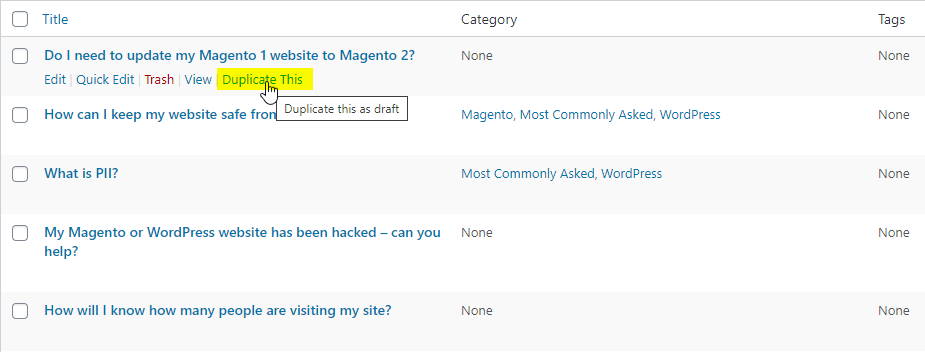
Once you install and activate the plugin, you’ll notice new options in the WordPress dashboard that let you duplicate posts, pages, and any other custom post types you use. It’s as simple as clicking the “Duplicate This” button!
Duplicating WordPress Pages Using a Page Builder Plugin
Drag-and-drop page building plugins like Elementor and WP Bakery are becoming more and more popular. They provide you with a ton of features for building stunning pages and all the options you need to adjust sizing, spacing, colors, and more. However, with so many features and options, creating a new page can take a lot of time.
The Duplicate Page plugin is compatible with these page building plugins, but sometimes you don’t necessarily want to copy the entire page. Maybe you just want to reuse one design element that you worked hard on, and don’t need anything else from the page. Luckily most popular page-building plugins come with their own copying and templating features to speed up the page creation process.
Duplicating with Elementor
Elementor provides tons of useful features for duplicating entire pages or individual design elements. When you’re working on a page in Elementor, you can right-click to bring up a menu with some neat options:
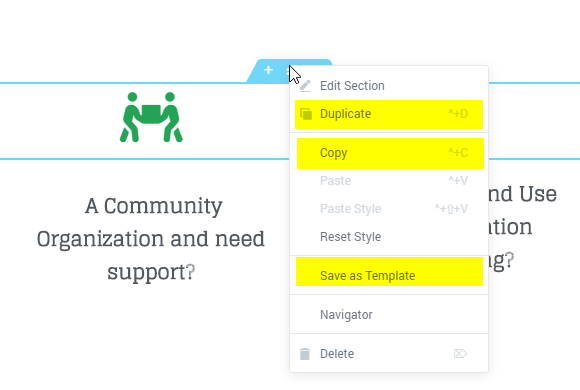
Clicking “Duplicate” will create an exact copy of the element you clicked on. It will appear just below the initial element, and you can drag and drop it wherever you need it. This is useful if you need to have the same element appear several times on the same page.
Clicking “Copy” works just like it does on your computer. Elementor will save this element to your clipboard and you can paste it wherever want – even on a completely different Elementor page that you have open in another tab or window! This is definitely one of our favorite Elementor features.
Clicking “Save as Template” will let you save the element to your website’s database so you can use it whenever you need it in the future. It’s similar to the “Copy” feature, but more long-term. You don’t have to worry about overwriting it if you copy a different element – it will always be available in your Templates.
Duplicating with WP Bakery
WP Bakery is another popular page-building plugin, with similar duplication features to Elementor.
When editing a page in WP Bakery, hover your mouse over any element and you’ll notice a green menu appear. There’s a button in this menu that looks like two overlapping pages – this is the “Copy” button. Clicking this button will duplicate the element in place, allowing you to drag and drop the copy wherever you need it.
The copy button isn’t just limited to individual elements either; you can copy entire rows and everything inside them using the same button that appears on the top-left of a row.
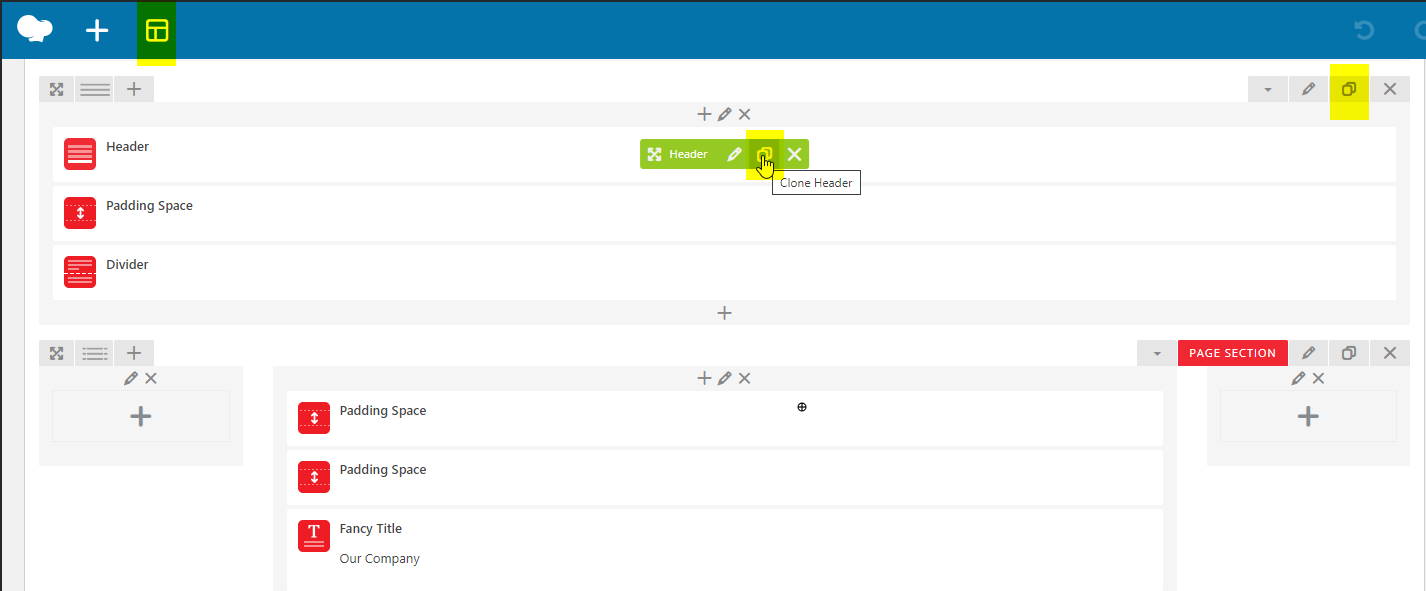
Need to copy something from WP Bakery to a completely different page? Never fear! WP Bakery has a template system that will let you do that. Just click the template button in the WP Bakery header navigation bar.
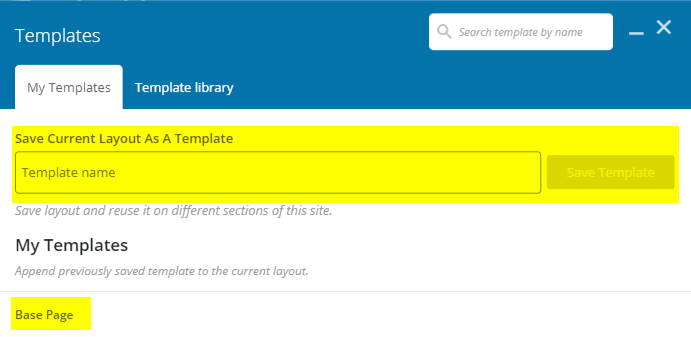
This will open up the Templates window, where you can either save your WP Bakery page as a template that you can use on other pages, or where you can select one of your existing templates to add it to the page you’re working on.
Putting It All Together
WordPress has evolved so much since its early days as a blogging platform. Back then, content and design were completely separate. As it grew into a full-fledged Content Management System, or CMS, we saw more crossover between content and design. Adding HTML to your site content would let you change design elements on individual pages, rather than relying entirely on a WordPress theme.
Nowadays, the lines between content and design have blurred entirely. Page-building plugins like the ones above let you create designs completely independant of your site’s theme, allowing you to have pages that look drastically different from one another. However, designing and building individual pages is hard work; having the option to duplicate individual design elements or entire pages is a huge time-saver. Without these features, using these page builders on a large scale just wouldn’t be feasible.
If you’ve read this far, you can now officially call yourself a page-duplicating pro. However, building a great website with consistent design elements isn’t always as easy as copying and pasting. If you ever need some assistance building a beautiful website, Watermelon Web Works is ready and waiting to help out!
Related Guides and Resources
- WordPress Security
- Why Your WordPress Site Is Not as Secure as You Think: Key Misconceptions In the rapidly evolving digital landscape of 2025, a secure online presence is non-negotiable for…