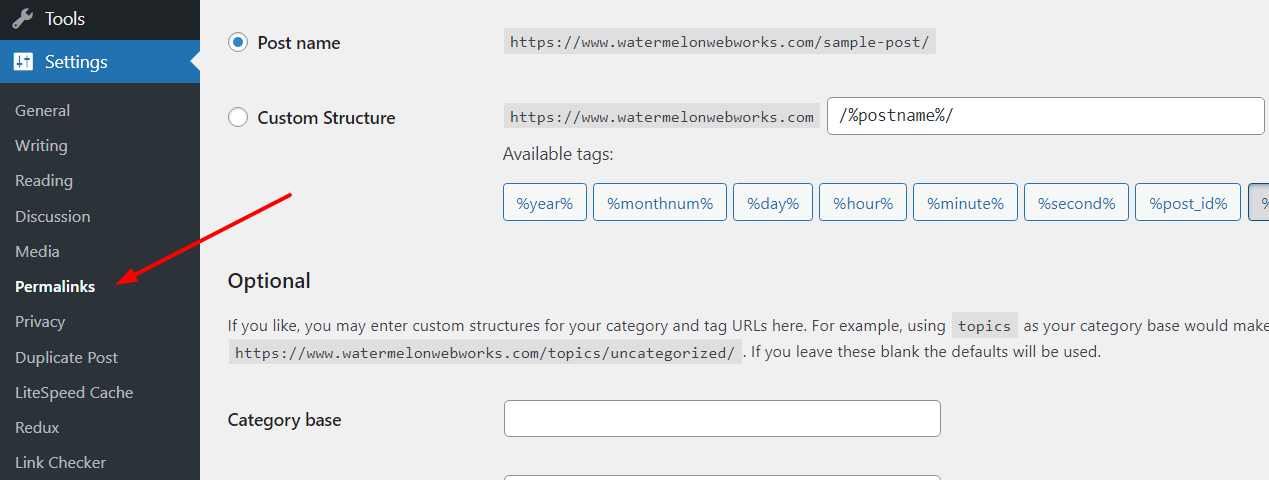
WordPress Permalinks Basics –

Worpress Permalinks

Each website page has a specific address, just like a home or business. In website jargon this is called the “url” or uniform resource locator. The technical details of how typing the url into the address bar (or clicking a link) actually brings up the specific webpage can get a bit complicated. On a simple level it involves back and forth communication between the web browser (Chrome, Edge, etc.) and the server, which is where the website is “hosted” which basically just means where all the files, images, and data for the website live. Along the way there is an “address lookup” which involves things like ip addresses, domain names, and DNS records.

How to Schedule Blog Postings in WordPress –

Pexels Mat Brown 552598

As web developers, we’re often working on the most complex features and integrations that WordPress is capable of. From creating custom website themes to building new plugins, or perhaps linking with a complicated third party API to sync data from another system, we usually are working on aspects of WordPress far beyond what most website … Read more

Enhancing Website Security and Performance

Security and performance

There’s a widely quoted and (typically misattributed) sentiment that works are never truly completed, only abandoned. This applies to website development as much as any other project but when it comes to the former, it is as much of a warning as a statement of integrity. A website that isn’t being actively maintained is a security risk and potential threat to an organization’s online presence, reputation and the data of their users and clients.

Link Gravity Forms with WooCommerce Products Easily

Gravity Forms Woocommerce Add Ons

Two of our favorite plugins for WordPress are the robust and powerful Gravity Forms and the ubiquitous eCommerce plugin WooCommerce.  Gravity Forms is a premium plugin that we like so much that we provide a free license to our clients as part of our WordPress Security and Performance Plan.  WooCommerce is the backbone of any WordPress eCommerce website, and the core software is free and developed/maintained by Automatic, who are the same folks that started and maintain WordPress itself.  Each plugin is wildly popular, and as such there are many add-ons that allow for integration with other software/plugins.  In this post we’re going to explore how you can use the WooCommerce plugin: Gravity Forms Product Add-ons in order to leverage the power of Gravity Forms to build intricate and conditionally based product configurations which link to a WooCommerce product, allowing you to then enjoy all of the eCommerce specific architecture that WooCommerce provides. 

Removing User Roadblocks From Your Website – Design

Pexels Ann H 3095695

Most businesses focus on adding fuel to propel their idea online. They look for ways to attract more visitors and spread their message. But what if your potential customers know about you and appreciate what you are doing but are still not interested in signing up, making a purchase, or any other number of end goals for your site? Consider if the online process which you interact with your customers has any friction or pain points, that stop them from making making that final conversion for you. Here is a list of important stumbling blocks to consider when it comes to your organization’s website, whether you run a WordPress non profit website focused on donations, a high volume Magento eCommmerce website, or any other site that has a specific goal for every user who lands there (which every website should).