

I’ve worked on a lot of WooCommerce stores.
That’s not meant as a flex, exactly. It’s more that I’ve had enough weird checkout problems, mystery slowdowns, cart issues, plugin conflicts, and “why is this suddenly broken?” moments pass across my desk that I usually have a good instinct for where to look first.
Bloated theme? Maybe.
Giant product images? Sure.
Cheap hosting being asked to do the work of a much better server? Happens all the time.
A plugin that says it “optimizes conversions” while quietly making the site do 400 extra things per page load? Also very possible.
But this one got me.
For several days, I was chasing a WooCommerce slow add to cart issue that looked simple at first and then, very rudely, refused to be simple.
The site loaded fine. That was the annoying part. Category pages were quick. Product pages were quick. Core Web Vitals weren’t screaming. From the outside, the store didn’t feel broken.
Until you clicked Add to Cart.
The 7-Second Purgatory
Then it just sat there.
Spin.
Spin.
Still spinning.
Eventually the cart drawer would open, but it was taking somewhere around 7 seconds. Sometimes a little more. Sometimes a little less. Long enough that a normal customer would start wondering whether anything had happened. Long enough for someone to click twice. Long enough for someone to leave.
And that’s the sneaky thing about this kind of WooCommerce performance problem. A store can look fast right up until the exact moment when speed actually matters.
A slow homepage is bad. A slow product page is bad. But a slow Add to Cart button is sitting right in the path between “I want this” and “I bought this.”
TL;DR: It Wasn’t the Theme, and It Wasn’t Just Hosting
The short version is that the Add to Cart action was getting dragged down by database bloat and leftovers from an old dynamic pricing plugin.
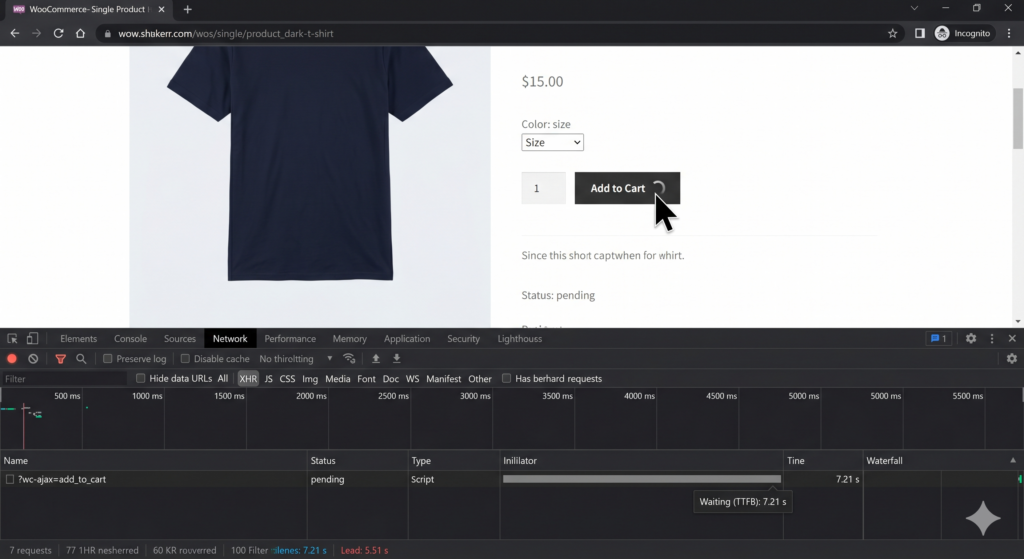
The site itself felt fast because the normal pages were cached and behaving well. But Add to Cart is dynamic. It has to talk to WooCommerce, the cart session, the database, and any pricing or cart logic that’s still hanging around.
In this case, WooCommerce was trying to add a simple product to the cart while wading through a bloated wp_options table and old plugin data that should’ve been cleaned out months earlier.
So I started with the usual suspects.
The Usual Suspects, Because Of Course
I checked the server first. CPU was fine. PHP workers weren’t melting down. Redis object caching was active. Nothing obvious was on fire.
Then I looked at the classic WooCommerce cart fragments issue, because of course I did. If you’ve worked with WooCommerce for any length of time, you’ve probably met wc-ajax=get_refreshed_fragments, and maybe muttered something unkind about it. It updates cart totals and mini-carts across the site, which is useful, but it can also become a performance tax on pages that don’t need it.
I adjusted that. It helped the site generally, but it didn’t fix the actual Add to Cart delay.
Fine.
Next stop was plugin conflict roulette, everyone’s favorite deeply unpleasant carnival game.
I cloned the site to a dev site and stripped it back. Disabled nearly everything except WooCommerce. The Add to Cart action improved, but only from “awful” to “still not acceptable.” We were still looking at around 4 seconds on a stripped-down staging site.
This was the point where I was eating the nasty pink sprinkle doughnuts someone had brought in as a way to soothe my tortured mind.
I was irritated. Not dramatic irritated. Just that quiet developer irritation where you lean closer to the screen and start taking the problem personally.
I opened Chrome DevTools and watched the network request directly. The ?wc-ajax=add_to_cart request wasn’t waiting on some obvious third-party service. It wasn’t hanging because of a payment gateway. It wasn’t making a call to a shipping API.
The delay was happening before the server even sent back the first byte.
That meant the problem was probably inside WordPress, WooCommerce, or the database.
1,400 Queries for a Single Product
So I installed Query Monitor, clicked Add to Cart again, and watched the query count climb.
There it was.
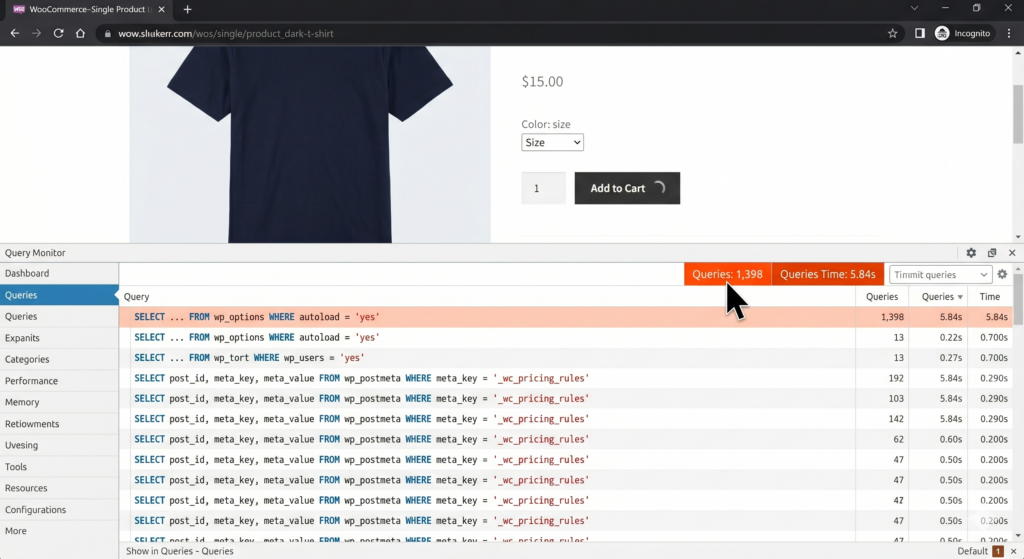
Nearly 1,400 database queries just to add one product to the cart.
One product.
Not a configurable bundle. Not a complicated subscription. Not a product with 900 variations and a pricing matrix that required a minor in economics.
Just one normal product going into the cart.
At that point, the whole thing started to feel less like “WooCommerce is slow” and more like “WooCommerce is being asked to walk through a storage unit full of old junk before it can do anything useful.”
And that turned out to be pretty close to the truth.
The wp_options Table Was a Swamp
The first problem was the wp_options table.
It was enormous. Not “a little messy” enormous. More like “why is this still functioning at all?” enormous.
A big part of the bloat was old WooCommerce session data. Rows and rows and rows of _wc_session_ entries that should’ve been cleared out long ago. For whatever reason, they hadn’t been. The store had been accumulating old cart and session data like a garage where nobody ever throws out a cardboard box.
Every time someone clicked Add to Cart, WooCommerce had to wade through that entire mess.
That alone would’ve been enough to cause pain.
But there was a second problem too, because apparently one problem wasn’t enough.
The Ghost of Plugins Past
Months earlier, the client had tested a dynamic pricing plugin. They didn’t like it. They removed it. End of story, right?
Not quite.
The plugin was gone from the WordPress admin, but it had left little fingerprints behind in the database. Old meta keys. Old rule data. Old assumptions. The ghost of a pricing system that no longer existed.
And during the Add to Cart process, WooCommerce was still getting pulled into checks related to old discount logic. It was essentially asking, “Does this product qualify for that old BOGO rule?” even though the BOGO rule was gone, the plugin was gone, and everyone involved wished this conversation had ended several days earlier.
So the site had two things happening at once.
The cart action was dynamic, so page cache couldn’t save it.
The database was bloated with old WooCommerce sessions.
And old pricing-plugin leftovers were causing unnecessary checks during the exact moment when the customer was trying to add something to the cart.
Perfect little swamp.
The Fix Was Annoyingly Simple Once I Could See It
Once I could actually see the problem, the fix wasn’t that dramatic. Which is always both satisfying and mildly insulting after you’ve spent days chasing it.
First, I cleared WooCommerce sessions and expired transients through WooCommerce’s built-in tools.
Then I went directly into the database and cleaned out the remaining old _wc_session_ rows from wp_options. Carefully, obviously. This isn’t a “just randomly delete things from the database” situation. But the dead session data had to go.
Then I cleaned up the leftover data from the old dynamic pricing plugin. Orphaned post meta, old rule fragments, unused leftovers, anything that was clearly tied to a system the store wasn’t using anymore.
After that, I optimized the database tables.
Then I revisited cart fragments and made sure they weren’t being loaded where they weren’t needed. I don’t like disabling useful WooCommerce behavior blindly, because sometimes those little pieces are doing real work. But on informational pages, blog posts, and other non-shopping areas of the site, there wasn’t any reason to make WooCommerce constantly refresh cart fragments in the background.
The Moment of Truth
Then came the moment.
Clear cache.
Open incognito.
Go to a product.
Click Add to Cart.
And instead of the little spinner of despair, the cart responded almost instantly.
About 0.4 seconds.
I tried another product.
Same thing.
The cart drawer opened immediately. The item was there. No drama. No awkward pause. No customer wondering whether the store had broken.
I may have made an actual noise out loud. Not a professional noise. More of a tired raccoon discovering a sandwich kind of noise.
But it was fixed.
What I’d Check If Your WooCommerce Add to Cart Button Is Slow
And honestly, this is why I wanted to write the post.
Because when store owners search for WooCommerce slow add to cart, a lot of the advice they find is technically true but not always helpful.
Yes, hosting matters.
Yes, caching matters.
Yes, themes and plugins matter.
Yes, cart fragments can be a problem.
But the Add to Cart action isn’t the same thing as loading a normal cached page. It’s dynamic. It has to talk to WooCommerce. It has to touch the session. It often has to check pricing rules, stock status, cart rules, shipping logic, coupons, memberships, subscriptions, or whatever else the store has accumulated over the years.
So if your WooCommerce site feels fast until someone clicks Add to Cart, don’t assume the answer is “buy a bigger server.”
Maybe that helps. Sometimes it does.
But there’s a very good chance the real problem is lower down in the machinery.
Check the database.
Look at the wp_options table.
Look for old WooCommerce sessions.
Look for orphaned plugin data from pricing, discount, shipping, subscription, or membership plugins.
Use Query Monitor and watch what actually fires when Add to Cart is clicked.
Because a slow WooCommerce cart often isn’t one big obvious thing. It’s usually a pile of old decisions, expired data, abandoned plugin settings, and dynamic requests that page caching can’t hide anymore.
The Part That Actually Matters
In this case, the storefront looked healthy. The product pages looked healthy. SEO traffic was still coming in.
But the most important button on the site was quietly costing sales.
That’s the part I keep coming back to.
Performance problems aren’t always dramatic. Sometimes they’re just a 7-second pause in the worst possible place.
And once we removed that pause, the store felt completely different. Not just faster in a technical sense. More trustworthy. More alive. More like a store that was ready to take the order instead of thinking about it for a while.
The client was relieved.
I was relieved.
And somewhere in the database, I assume, the ghost of that old dynamic pricing plugin is still angry with me.